AutoCom - Truck Code Reader and Data Scanner

BEST Vehicle coverage! This is a tool no truck workshop should be without!

Professional diagnostics for light and
heavy commercial vehicles
Do you want to concentrate on finding and repairing vehicle defects rather
than wasting time on trying to understand complicated and obsolete software?
Autocom has arguably the most intuitive and user-friendly diagnostics
software on the market. Autocom’s development work always has the end user
in focus.
Autocom TRUCKS is a diagnostics program for the following vehicle
interfaces: CDP, SDP and ADP 186. The program can run on PC, Laptop and PPC,
making Autocom TRUCKS one of the most flexible and powerful diagnostic tools
on the market for all vehicle workshops.
All of Autocom’s products include wireless communication. The software
contains a comprehensive database with manufacturer-specific OBD* giving
superior vehicle coverage.
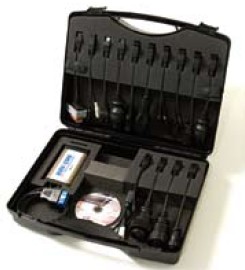
Click on a picture to enlarge it.
Typical Live Data Screens

Typical Live Data Screens
Click on a picture to enlarge it.
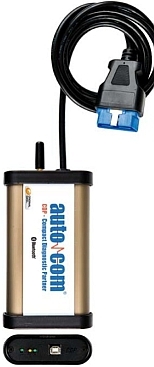
The CDP vehicle interface
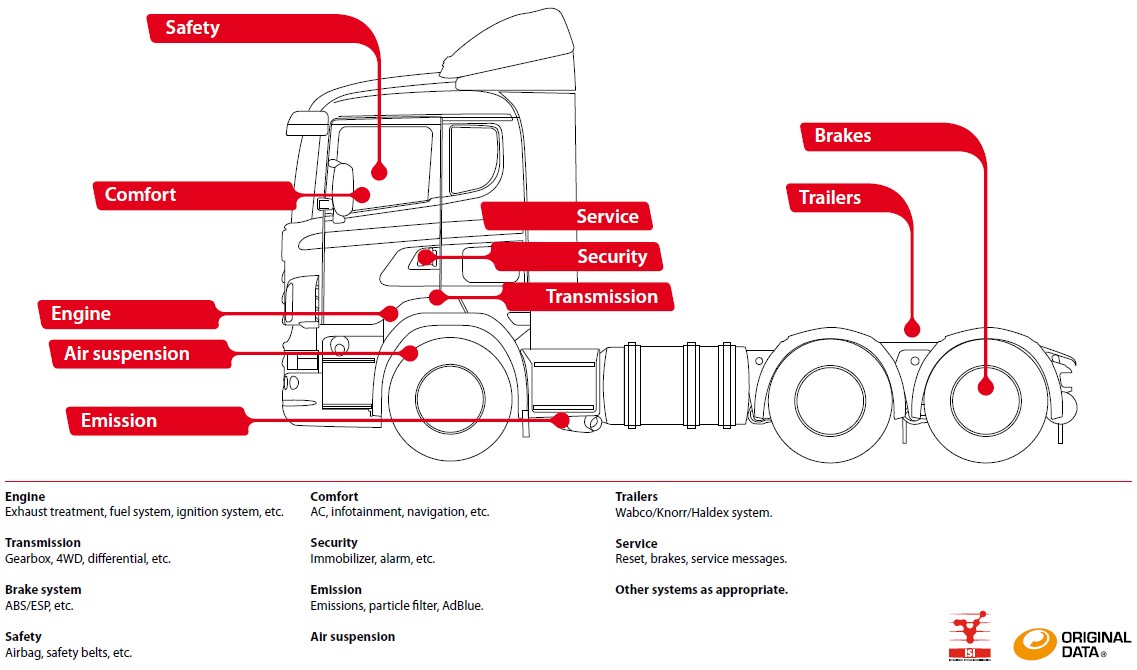
To make life even easier, Autocom has developed a number of functions to help the user make the right decisions. One such example is ISI (Intelligent System Identification) in which the software automatically detects a particular vehicle’s system for diagnosis. This saves a great deal of time and ensures that the right result is achieved.
Additional information such as repair data, service and electrical diagrams from external suppliers can be combined with the program via pre-prepared links.
The Software and databases are available in several languages.
Functions:
READ DTC (Diagnostic
Trouble Codes)
Selecting this function allows the Scan Tool to read the Diagnostic Trouble
Codes (DTC's) from the vehicle control modules. DTC's are used to help
quickly determine the cause of a problem or problems within a vehicle. These
codes cause the control module (ECU) to illuminate the Malfunction Indicator
Lamp (MIL) when a fault occurs with one of the monitored systems. MIL is also
known as 'Service Engine Soon' or 'Check Engine' or 'Visit Workshop' lamp.
ERASE DTC
The ERASE DTC function clears the DTC's and reset all the
I/M Readiness Monitor Status to a NOT-RUN flashing condition. To set all of
the Monitors to a DONE status, an OBDII Drive Cycle must be performed.
Please refer to the vehicle service manual for information on how to perform
an OBDII Drive Cycle for the vehicle under test. This usually involves
driving the vehicle under certain conditions in order for the ECU's to
'relearn' the driving cycle. Erasing the DTC's from the ECU's memory also
helps with "before and after" diagnostics.
LIVE DATA
The Live Data function allows Real Time Viewing of the vehicles computer
module PID data. As the computer monitors the vehicle, information is
simultaneously transmitted to the scan tool in real time. In this mode, one can see all
engine parameters in color as engine temperature, advance, engine speed,
throttle position etc. etc. This unit also allows you to Save the live data
readings for later comparison with a similar vehicle! The color coding
changes as the monitored values go higher or lower from a predetermined
range. This helps greatly with finding intermittent or latent problems.
FREEZE FRAME
When an emission-related fault has occurred, certain vehicle data is
recorded by the on-board computer. This information is referred to as Freeze
Frame data. FREEZE FRAME is a snapshot of the operating conditions of the
engine and the relevant sensor values at the time when the fault had occurred.
This way you can see what the operating state of the system (say engine) was
when the fault occurred. i.e. engine temp, timing, vehicle speed, RPM,
throttle position, etc. etc.
MIL STATUS
When the vehicle on board computers detects a problem in their related
systems or components, their self-diagnostic program will assign a fault code (DTC)
and store it in its memory. They also record a Freeze Frame of the
conditions present when the fault was found and set the Malfunction
Indicator Lamp (MIL) alight. Some faults require detection for two trips in
a row before the MIL is turned on. This mode is used to check the status of
the MIL light, whether it had been set on or off in case the MIL on the
dashboard had malfunctioned or tampered with.
I/M READINESS
The I/M Readiness (Inspection / Maintenance Readiness) function is used to
view a snapshot of the operations on the emission system monitors in OBD II
equipped vehicles. The vehicle ECU constantly monitors it's dependant
systems and if one of them can not complete a full check it might set a DTC.
i.e. the engine temperature should complete a full circle from cold to hot
in order for the relevant I/M to be considered as 'complete'.
LIVE ACTUATIONS (where available
or permitted by the ECUs)
Some ECU's permit you to actuate (switch
On/Off etc. etc.) some of their operating circuits in order to diagnose
functionality of the relevant actuators. i.e relays, fans, door locks,
lights, injectors, A/C clutch etc. etc.
VEHICLE
INFORMATION (where available or permitted by the ECUs)
This function allows the Scan Tool to request the vehicle information (VIN),
calibration ID(s) which identifies software version in vehicle control
module(s), and calibration verification numbers (CVN(s), Ignition Key's, etc. etc.
ECU VALUES ADAPTATION /
RESET, KEY and Parts CODING (where available or permitted
by the ECUs and/or vehicle manufacturer)
Increasingly, some vehicle spare parts come with
'coded' numbers that have to entered in to the ECU in order to recognize
and/or accept the new (or second hand) part. ECU's, Injectors, spare keys,
radios and even starters are now coming out 'coded'. This function is
indispensable if you need to change those vehicle parts.
This Diagnostic tool is unique
as it can work on both CARS and TRUCKS.
The CDP (the hardware) works on both, providing you have the necessary
cables.
The Software however is divided into two categories:
- Cars & Light Commercial
Download
the CARS Application list here. -(PDF file)
- Light Commercial and Trucks Download the
TRUCK Application
List here. -(PDF file)
The Software categories can be ordered separately or together.
This gives you more upgrade flexibility if you later decide to move from
Cars into Trucks or vise-versa or need to cover both.
It also saves you money as you only pay for the Software category you are
missing (plus any necessary cables), but not for the main hardware interface
(the CDP)
The AutoCom (in any configuration) is a PC based Diagnostic Tool. This means you can use your existing Laptop or a PC and save even further.
AutoCom Cars -
brochure - download (PDF file)
AutoCom
Trucks - brochure - download (PDF file)
Automotive Equipment - in tune with the Future

Crypton Diagnostic Equipment Home